


LaunchWeather
3.626.00 Reviews
App Specs
- Version
- 1.2.1
- Updated On
- License
- Free
- Downloads
- 100,000+
- Developer
- Lumora Studio
- Categories
- Weather
- Platform
- Android
Screenshots
 Analysis by AppCompare
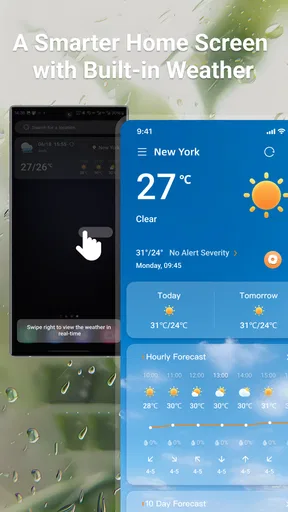
I usually check the weather for one practical reason: to decide what to wear, when to leave, or whether a plan needs a backup. LaunchWeather is built around making that check easy to reach, with weather information available from your home screen. That small change in routine is its clearest appeal. Instead of opening an app and navigating around, I can make a quick glance part of the same habit as checking the time or calendar.
A forecast that stays close at hand
The useful idea here is convenience rather than a complicated weather toolkit. A home-screen view can answer the everyday question that matters most—what sort of conditions am I heading into?—before I’ve even started getting ready. For a short errand or a commute, that can be enough to decide whether a light jacket is sensible or whether I should allow extra time.
I find this approach especially helpful when I’m moving between tasks. If I’m preparing breakfast, packing a bag, or getting a child ready for school, I don’t necessarily want to stop and explore a full forecast. A brief look at the screen can prompt me to check more carefully when the weather seems changeable. The real benefit is reducing the effort of checking, not replacing good judgement.
Making the glance useful
A home-screen weather view works best when it becomes part of a decision, rather than something I check repeatedly without acting on. I’d use it before choosing clothes, before walking the dog, or while deciding whether to carry a rain layer. For plans later in the day, I’d still open the app and look beyond the immediate conditions instead of treating a quick glance as a promise about what will happen hours from now.
One practical habit is to check at two moments: once while planning the day and again before leaving if the weather could affect the trip. That avoids relying on a stale impression from the morning. If I’m heading somewhere unfamiliar, I’d also make sure the location I’m checking is the one that matters; weather where I live may not match conditions across town or at a destination.
Where it fits among weather apps
Many weather apps try to serve as an all-in-one forecasting desk, filling the screen with charts, maps, alerts, and extra reading. LaunchWeather’s home-screen focus is more appealing when speed matters more than depth. I’d choose it for routine checks and keep a more detailed forecasting source in mind for outdoor plans, travel, or situations where a change in conditions could have bigger consequences.
That distinction matters because no quick display can do every job equally well. A glance is convenient, but it can encourage overconfidence if I treat it as a full assessment of the day. For hiking, a long drive, or a weather-sensitive event, I’d want to inspect a fuller forecast and any relevant warnings before setting off. The shortcut is most useful as the first step, not necessarily the last.
Worth Reading Before You Choose

EA SPORTS FC Mobile 26 Is a Bigger Football Game, but It Takes Time

Flipboard Shows What News Apps Must Do Beyond the Feed

Switching to Android Auto Means Rethinking Your Driving Routine

Google Calendar Makes a Crowded Week Easier to Manage

Ludo King Makes the Most of the Minutes Between Plans

Baby Panda World Brings Quick Play to Modern Phones, but Its Game Library Feels Busy
Who gets the most from it
LaunchWeather is a sensible fit for people who want weather close at hand without making a forecast check into a project. It may suit commuters, students, parents, and anyone who makes small decisions throughout the day based on the sky. If you rarely need more than a quick indication before stepping outside, the home-screen approach is easy to understand and easy to fold into an existing routine.
I’d be less inclined to rely on it as my only weather tool if I regularly plan around detailed conditions or need to compare forecasts for several places. In that case, a service built around deeper forecast detail may be a better match. The choice comes down to what you want most: an accessible everyday check or a more involved picture of changing weather.
Small habits that make the shortcut smarter
To get more value from a quick weather view, I’d put it somewhere I naturally look rather than burying it on a rarely used screen. I’d also connect the check to a routine I already have—getting dressed, filling a water bottle, or picking up keys. That makes the information actionable and helps prevent the familiar mistake of remembering the weather only after I’ve left home.
There’s also a useful distinction between checking conditions and making a plan. A brief view can tell me whether I should investigate further, but it should not decide every detail of an outing. If the day involves a long walk, outdoor work, or a tight travel schedule, I’d use the quick access as a prompt to review conditions again closer to departure.
Simple Yet Stunning Interface
First off, let’s talk about the app’s interface. You know that feeling when you open an app and everything just clicks? That’s LaunchWeather for you. The design is sleek, colorful, and incredibly user-friendly. I’m talking smooth navigation with vibrant icons that make checking the weather feel more like a treat than a chore.
What I love most is how they use colors to indicate different weather conditions. You’re greeted with sunny yellows on bright days and calming blues when it’s a bit cloudy. It’s a small touch, but it makes a huge difference in how you perceive the information.
Features That Stand Out
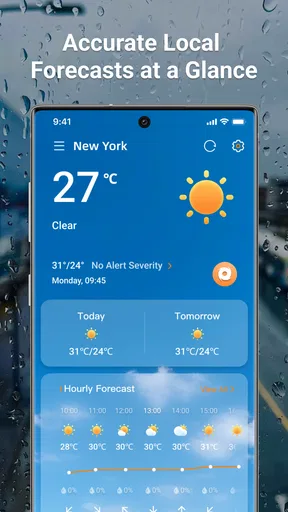
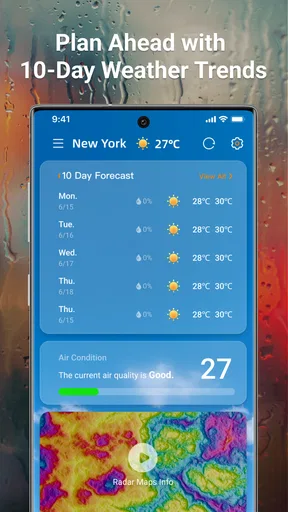
Now, let’s get into the features because this app is packed with them. Of course, you’ve got your basics: current weather, hourly updates, and a 7-day forecast. But where LaunchWeather shines is in its extra features. Ever wondered what the weather’s like in your favorite cities around the world? Just add them to your list and you’re good to go.
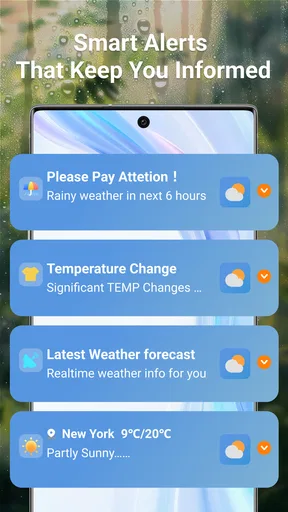
One of the coolest features is the “Weather Alerts.” It’s like having your personal meteorologist who whispers in your ear whenever there’s a significant weather change. No more getting caught in unexpected rainstorms!
Interactive and Engaging
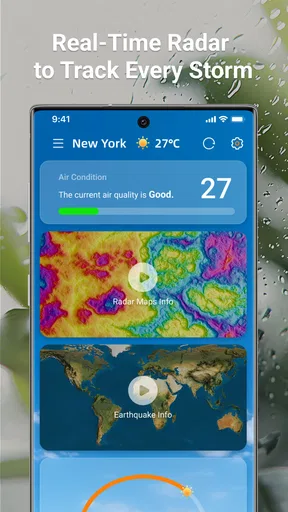
Here’s something you don’t see every day: interactive weather maps that make you feel like a weather detective. Drag, zoom, and explore weather patterns as if you’re on a virtual adventure. It’s not just informative but also strangely addictive.
And let’s not forget the personalized weather news. The app curates articles and news based on your location and preferences. So, you’re not only getting weather updates but also learning more about meteorological events that might interest you.
Performance and Reliability
When it comes to performance, LaunchWeather doesn’t disappoint. The app runs smoothly without any hitches, and its data is accurate — which is pretty crucial for a weather app, right? I’ve been using it for a while now, and I’ve yet to encounter any bugs or crashes. That’s a win in my book.
As an app from Lumora Studio, it is free to use and rated for everyone. Its 3.6 average from around 900 ratings suggests a mixed reception, so I’d approach confident claims about reliability with a little care. It has passed 100,000 installs, and version 1.2.1 is listed for Android 6.0 and newer. I’d check that my phone meets the minimum before installing, then judge its day-to-day performance on my own device rather than assuming every experience will be identical.
For a normal routine, the best test is practical: check the conditions before leaving, then compare the forecast with what actually happens over several days. Weather predictions naturally involve uncertainty, and an attractive display does not make them infallible. I’d keep alerts enabled only if I find them useful, and treat an alert as a reason to review plans—not as a guarantee that conditions will unfold in exactly one way.
Why You’ll Love It
So, why should you give LaunchWeather a shot? It’s all about the experience. It transforms something as mundane as checking the weather into a fun and engaging activity. Whether you’re a weather enthusiast or just someone who likes to stay prepared, this app adds a bit of sunshine to your daily routine.
In a world full of generic weather apps, LaunchWeather stands out with its unique approach and compelling features. So, if you’re ready for a weather app that’s as lively as it is reliable, give it a try. You might just find yourself looking forward to your daily weather check!
A realistic morning test
Imagine a damp-looking morning when I need to walk to the bus stop and later spend time outdoors. I’d use the home-screen view to make the first decision quickly, then check the hourly outlook before choosing whether to bring a rain layer. If an alert arrives, I’d use it as a nudge to reconsider the timing or route, not as a substitute for checking the forecast myself. That workflow keeps the convenient glance useful while avoiding the trap of assuming the first thing I saw will cover the whole day.
For a family, the same routine can prevent small last-minute scrambles: check before packing a school bag, then reassess before an after-school activity. For someone who works outside, however, a quick display is only a starting point. I’d want a fuller view before committing to a long task, because the cost of getting conditions wrong is higher than it is for a short walk to a nearby shop.
Choosing between convenience and detail
The usual alternatives range from a basic phone weather panel to dedicated apps that emphasize maps, long-range forecasts, or dense meteorological detail. LaunchWeather’s appeal is the quick, approachable check; a more technical service may be better if I want to study changing patterns or compare several forecast views. Neither style is automatically superior. I’d pick the simpler route for routine decisions and reach for a deeper source when a trip, event, or outdoor activity depends on the details.
There is a trade-off in any home-screen shortcut: it can make information easier to see, but it also makes a quick snapshot feel more definitive than it is. I’d avoid using one glance to plan a full day, particularly when conditions may change between morning and evening. The most useful habit is to let the shortcut tell me whether I should investigate further, then open the forecast when the decision deserves more care.
What to expect before installing
LaunchWeather is free, so trying it does not require a purchase, and its Everyone age rating makes it suitable for a broad audience. The release date is Aug 26, 2025, which also makes it a relatively new option; I’d give the experience a little time in my routine before deciding whether its design and quick access are enough to replace an app I already know. If my phone runs Android 6.0 or newer, it meets the stated minimum operating-system requirement.
The main question I’d ask myself is not whether I need another forecast on my phone, but whether I would actually use a weather check more often if it were easier to reach. If the answer is yes, the home-screen approach has a clear purpose. If I already open a detailed weather app several times a day and rely on maps or extensive planning, the added shortcut may feel redundant rather than useful.
My final take
For me, LaunchWeather makes the most sense as a low-friction companion for everyday decisions: what to wear, whether to carry an extra layer, and whether to pause before heading out. Its colorful presentation can make those checks pleasant, while its home-screen focus gives the app a distinct practical role. I’d recommend trying it if convenience is the missing piece in your weather routine, but I wouldn’t treat a quick view as a replacement for careful planning when the forecast matters.
That balance is what defines the app for me. It can help me notice the weather at the moment I need to make a small choice, yet the responsibility to check details still rests with me. If you want an accessible daily glance and appreciate a lively interface, it is worth considering; if precision-heavy planning is your priority, a more detailed weather service is likely the better fit.
Pros
- User-friendly interface with intuitive navigation.
- Accurate and timely weather updates.
- Detailed forecasts with hourly breakdowns.
- Customizable alerts for severe weather.
- Supports multiple locations for easy tracking.
Cons
- Occasional ads can be intrusive.
- Requires internet for real-time updates.
- Limited widget customization options.
- Some features locked behind a paywall.
- Battery consumption can be high.
FAQs for LaunchWeather
What features does LaunchWeather offer?
LaunchWeather provides real-time weather updates, detailed forecasts, and severe weather alerts. Users can access hourly and weekly forecasts, track weather patterns with interactive radar maps, and receive personalized weather notifications based on their location. Additionally, the app offers a sleek, easy-to-navigate interface, making it user-friendly for all age groups.
Is LaunchWeather free to use, or are there any in-app purchases?
LaunchWeather is free to download and use, offering basic weather updates at no cost. However, it includes optional in-app purchases for premium features such as ad-free usage, advanced radar capabilities, and detailed long-term forecasts. These purchases enhance the user experience but are not necessary for basic functionality.
How accurate is the weather data provided by LaunchWeather?
LaunchWeather sources its data from reputable global weather services, ensuring high accuracy and reliability. The app is designed to provide users with precise and up-to-date information, thanks to its integration with advanced meteorological data and algorithms. User feedback consistently highlights its dependable performance in various locations worldwide.
Does LaunchWeather require location access, and how does it handle privacy?
To deliver accurate local weather updates, LaunchWeather requires access to your device’s location services. The app prioritizes user privacy, ensuring that all location data is securely managed and used solely for providing weather information. Users can manage location permissions in their device settings at any time.
Can I customize the notifications and alerts in LaunchWeather?
Yes, LaunchWeather offers customizable notifications and alerts. Users can set preferences for severe weather alerts, daily forecasts, and specific weather conditions they want to monitor. This ensures that users receive only the information they find most relevant, enhancing their overall experience with the app.


